Home Blog Page 25

sbi ki Internet banking kaise start kare

At hamarihelp, accessible from https://www.hamarihelp.com, one of our main priorities is the privacy of our visitors. This Privacy Policy document contains types of information that is collected and recorded by hamarihelp and how we use it. If you have additional questions or require more information about our Privacy Policy, do not hesitate to contact us. This Privacy Policy applies only to our online activities and is valid for visitors to our website with regards to the information that they shared and/or collect in hamarihelp. This policy is not applicable to any information collected offline or via channels other than this website. Consent By using our website, you hereby consent to our Privacy Policy and agree to its terms. Information we collect The personal information that you are asked to provide, and the reasons why you are asked to provide it, will be made clear to you at the point we ask you to provide your personal information. If you contact us directly, we may receive additional information about you such as your name, email address, phone number, the contents of the message and/or attachments you may send us, and any other information you may choose to provide. When you register for an Account, we may ask for your contact information, including items such as name, company name, address, email address, and telephone number. How we use your information We use the information we collect in various ways, including to: Provide, operate, and maintain our webste Improve, personalize, and expand our webste Understand and analyze how you use our webste Develop new products, services, features, and functionality Communicate with you, either directly or through one of our partners, including for customer service, to provide you with updates and other information relating to the webste, and for marketing and promotional purposes Send you emails Find and prevent fraud Log Files hamarihelp follows a standard procedure of using log files. These files log visitors when they visit websites. All hosting companies do this and a part of hosting services' analytics. The information collected by log files include internet protocol (IP) addresses, browser type, Internet Service Provider (ISP), date and time stamp, referring/exit pages, and possibly the number of clicks. These are not linked to any information that is personally identifiable. The purpose of the information is for analyzing trends, administering the site, tracking users' movement on the website, and gathering demographic information. Our Privacy Policy was created with the help of the Privacy Policy Generator and the Disclaimer Generator. Cookies and Web Beacons Like any other website, hamarihelp uses 'cookies'. These cookies are used to store information including visitors' preferences, and the pages on the website that the visitor accessed or visited. The information is used to optimize the users' experience by customizing our web page content based on visitors' browser type and/or other information. For more general information on cookies, please read "What Are Cookies". Google DoubleClick DART Cookie Google is one of a third-party vendor on our site. It also uses cookies, known as DART cookies, to serve ads to our site visitors based upon their visit to www.website.com and other sites on the internet. However, visitors may choose to decline the use of DART cookies by visiting the Google ad and content network Privacy Policy at the following URL – https://policies.google.com/technologies/ads Advertising Partners Privacy Policies You may consult this list to find the Privacy Policy for each of the advertising partners of hamarihelp. Third-party ad servers or ad networks uses technologies like cookies, JavaScript, or Web Beacons that are used in their respective advertisements and links that appear on hamarihelp, which are sent directly to users' browser. They automatically receive your IP address when this occurs. These technologies are used to measure the effectiveness of their advertising campaigns and/or to personalize the advertising content that you see on websites that you visit. Note that hamarihelp has no access to or control over these cookies that are used by third-party advertisers. Third Party Privacy Policies hamarihelp's Privacy Policy does not apply to other advertisers or websites. Thus, we are advising you to consult the respective Privacy Policies of these third-party ad servers for more detailed information. It may include their practices and instructions about how to opt-out of certain options. You can choose to disable cookies through your individual browser options. To know more detailed information about cookie management with specific web browsers, it can be found at the browsers' respective websites. CCPA Privacy Rights (Do Not Sell My Personal Information) Under the CCPA, among other rights, California consumers have the right to: Request that a business that collects a consumer's personal data disclose the categories and specific pieces of personal data that a business has collected about consumers. Request that a business delete any personal data about the consumer that a business has collected. Request that a business that sells a consumer's personal data, not sell the consumer's personal data. If you make a request, we have one month to respond to you. If you would like to exercise any of these rights, please contact us. GDPR Data Protection Rights We would like to make sure you are fully aware of all of your data protection rights. Every user is entitled to the following: The right to access – You have the right to request copies of your personal data. We may charge you a small fee for this service. The right to rectification – You have the right to request that we correct any information you believe is inaccurate. You also have the right to request that we complete the information you believe is incomplete. The right to erasure – You have the right to request that we erase your personal data, under certain conditions. The right to restrict processing – You have the right to request that we restrict the processing of your personal data, under certain conditions. The right to object to processing – You have the right to object to our processing of your personal data, under certain conditions. The right to data portability – You have the right to request that we transfer the data that we have collected to another organization, or directly to you, under certain conditions. If you make a request, we have one month to respond to you. If you would like to exercise any of these rights, please contact us. Children's Information Another part of our priority is adding protection for children while using the internet. We encourage parents and guardians to observe, participate in, and/or monitor and guide their online activity. hamarihelp does not knowingly collect any Personal Identifiable Information from children under the age of 13. If you think that your child provided this kind of information on our website, we strongly encourage you to contact us immediately and we will do our best efforts to promptly remove such information from our records.

Sbi Internet banking नमस्कार दोस्तों आज हम आपके बताने जा रहे है कैसे हम internet banking का use कर सकते है दोस्तों जैसा की आप सभी जानते है internet banking बहुत ही useful हमें पेमेंट करने के लिए और ये बहुत आसान है

How to start internet banking

Internet banking स्टार्ट करने के लिए आपको कुछ स्टेप्स फॉलो करने होंगे

  • बैंक में जाकर इन्टरनेट बैंकिंग के लिए अप्लाई करे
  • निचे दी गयी प्रोसेस को फॉलो करे

lets start how to activate internet banking

internet banking को activate करने के लिए आपको बैंक से एक pre printed kit मिलेगी उस kit में apko username और password मिलेगा आपको उस username और password से स्टेट बैंक की वेबसाइट में लॉग इन होना पड़ेगा अब आगे की प्रोसेस देखते है

  • सबसे पहले www.onlinesbi.com की वेबसाइट में जाये
  • अपनी internet banking ki pre printed kit में दिया गया यूजर नाम और password इंटर करे
  • इसके बाद आपसे फिर से confirm password पूछेगा उसको इंटर करे
  • इसके बाद अपना username choose करे याद रखे यही username आप login के टाइम put करेंगे इसलिए ध्यान से username choose करे और check avability पर क्लिक करे username एक्सेप्ट hone के बाद
  • password इंटर करे याद रखे password case सेंसिटिव रखे
  • password और confirm password confirm बटन पर क्लिक करे
  • new पेज ओपन होगा उसमे आपसे प्रोफाइल password पूछेगा आप प्रोफाइल password इंटर करे और फिर से confirm प्रोफाइल password इंटर करे
  • hint question select करके उसका answer write करे
  • birth city put करे
  • country choose करने के बाद अपना मोबाइल नंबर इंटर करे
  • submit बटन में क्लिक करे

आपका अकाउंट activate हो जायेगा

READ MORE blog se paise kaise kamaye

दोस्तों आपको अब हम बताते है की login password और प्रोफाइल password क्या है
login password

login password का use हम इन्टरनेट banking अकाउंट में login hone के लिए करते है बिना login username और password के हम इन्टरनेट banking में login नहीं हो पाएंगे login password सिर्फ अकाउंट में login करने के लिए use करते है

प्रोफाइल password

प्रोफाइल password का use हम बहुत सी facilty एक्सेस करने के लिए करते है जैसे हमें किसी को पैसे ट्रान्सफर करना हो या कुछ सर्विसेज यूजर करना होता है to हमसे प्रोफाइल password पूछा जाता है ये सिक्यूरिटी purpose के लिए होता है

For more info watch Video :  how to start internet banking इंटरनेट बैंकिंग कैसे चालु करे

दोस्तों internet banking ,tech and tips से related और भी पोस्ट हम आपके लिए लाते रहेंगे यदि आपके पास कोई सुझाव या आपके कोई questions है to आप हमसे पूछ सकते है आप अपने questions कमेंट कर सकते है और आपको यदि ये पोस्ट पसंद आये to आप शेयर औ

youtube वीडियो मैनेजर का उपयोग कैसे करें

youtube manager kaise use kare
youtube manager kaise use kare in hindi

How to use youtube video manager jaise ki aap sabhi jante hai dosto youtube ek bahut bada platform hai jisme humi bahut sari information milti koi bhi prb ho jo hame sikhne ho youtube me likho hame uske video mil jate hai youtube hamare liye ek bahut useful chiz bankar aaya hai dosto

Theek jaise hum logo ke liye youtube useful hai theek waise hi kuch youtuber ke liye bhi youtube bahut useful hai agar aap youtube ye to me apko aaj batagunga ki kaise hum youtube video manager ka use kare aur kaise hum accha video banaye

Benfits of youtube Mangers

  1. 1 Info & Setting Tab 

Dosto yadi aap info & setting Tab me click karenge to aapne jo video ko banaya hai aap usme basic information apke video ka title uska description aur apne video ke tag ko edit kar payenge aap thumbnail bhi change kar sakte hai

Aur Chaye to apne video ko public or private bhi kar sakte hai ye apke upar depend aur use kaha kaha share karna hai ye bhi decide kar sakte hai

iske alawa add to playlist bhi kar sakte hai


    2 .Translation

    Translation ka use karke aap video ka title aur description ko translate kar sakte hai


   3. Monetization

   aap Chaye to apne video ko motetize bhi kar sakte hai aur kis kis type ke add lagane ye yaha set kar   sakte hai


  4. Advanced Setting

Advance setting me aap comments ko allow karna hai nahi apne youtube ke license ko apne video ki category age restriction aur video ki language aur bhi bahut sari setting kar sakte hai

2. Enhancements

1 Enahancements me aap apne video ko stablize  auto fix kar sakte hai iske alawa aap filters ka use kar sakte hai aur aap usme blurring bhi use kar sakte hai

Bluring me do option aate hai

  • Face Blurring
  • Custom Blurring

Face Blurring ka use face ko blurring karne ke liye aap karte hai

Custom blurring ka use aap video ke us part me karte hai jisko aap video me nahi dikhana chate hai

3.Audio

Dosto Audio part me aap apne video me audio bhi laga sakte hai ye bahut hi useful hai suppose that apko apne video ke liye audio lagana hai to aap yaha se choose karke audio laga sakte hai

isme ek option hota hai aap chaye to apki voice aur audio dono ko mix karke bhi ok kar sakte hai

4.End Screen & Annotation 

End Screen Aur Annotation ka use aap video ki end me jab apka video end hoye waha kya show hona chaiye uske liye karte hai

Aapne Dekha hi hoga video jab end hota hai last me site me ek choti se place me koi dusri video dikhai deti hai isko aap End Screen bolte hai ise aap apne youtube manager se set kar sakte hai

Annonation me aap bahut saare opreation kar sakte hai

Add element me click karne ke baad apko bahut saare option milenge

  • Video Aur playlist
  • Subscribe
  • Channel
  • link

Isko aap Apne accoring Add kar sakte hai

5.Cards

Apne youtube video jab dekhe honge to dekha hi hoga video ke upar side me kuch na kuch apko dikhai deta hai jab koi youtuber kehta hai aap ye video dekhne ke liye is link pe click kijiye link apko show ho rahi hai dosto card ki help se aap apne viewer ko dusre video ke bare me bhi bata sakte hai

Card ka use jab hota hai maan lijiye apne kisi tipic bhi video banayi aur aap part 2 bata rahe ho but part 2 se pehle part 1 jaana  jaruri hai to aap bolenge ki part 1 dekhne ke liye is link pe click kijiye

Ye bhi bahut accha feature h youtube video manager ka

6.Subtitle

Subtitle to aap samazte hi honge aapne english movies dekhi hongi to usme aapne dekha hoga ki jab usme koi actor ya actress kuch bolte hai to usme likha dikhai deta hai waise hi youtube me subtitle dikhai deta hai

Subtitle bahut useful hai agar aap subtitle use karte hai koi bhi country ka person apke video ko easily samaz jayega isliye apne video me subtitle jarur lagaye

Dosto ye post kaisi lagi aap comment me apni valuable feedback jaruru dijiyega

how to use google maps

namaskar dosto aapka welcome hai Hamarihelp me aaj hum apko batyenge google ki ek behatrin apps ke bare me jo ki bahut hi useful Dosto kabhi kabhi hum kisi bahar ke place me jate hai ya koi address pata krna hota hai jo ki bahut  typical task hai

But Google maps ne ise bahut hi aashan kar diya ab hum kisi place ko asani se dhund sakte hai dosto some time hume apni nazdiki hospital ya phir petrol pump ya restaurant ya koi bhi important place jo ki hume maloom nahi hai hum pata kar sakte hai google maps ke madad se

Google Home kya hai kaise use kare

Google Meet App kya hai

What is google pay and how to earn money from google pay

Kya kya benfits hai google maps ke

  • Google maps se hum do place ke beech ka distance jaan sakte hai
  • Google maps ki help se best router find kar sakte hai aur kitna time hume lagega hum ye jaan sakte hai
  • Google maps me 2-3 type view show karta hai  aap chaye to satelite view dekh sakte hai aap jis road me travel kar rahe hai waha ka traffic bhi dekh sakte hai
  • Yadi aap apke friends se location share karna chate ho to share bhi kar sakte hai apka friends easily apki location dhund sakega

Dosto hope karte hai apko ye post acchi lagi hogi aap like aur comment kar sakte hai yadi kuch puchna chate hai to puch sakte hai

Top 3 apps for mobile battery saving

Battery save karna aaj ke time me bahut jaruri hai dosto yadi aap apne mobile ki battery save karna chata hai to aaj hum apko 5 battery saving apps ke bare me batyenge jisse ki aap apne mobile ki battery easily save kar payenge aur apni battery ki time ko bada payenge

1 . Du battery saver

Du battery saver app bahut hi acchi apps hai ye apki help karti hai battery ki life badhane me aap easily isko use kar sakte hai bahut hi popular app hai

2 battery doctor

battery Doctor bhi bahut badiya app hai iski madad se bhi aap apni battey ki life bada sakte hai ye apke liye bahut hi helpful hogi

3 Avast battery saver

 Avast battey saver is very useful and it is use to save mobile power

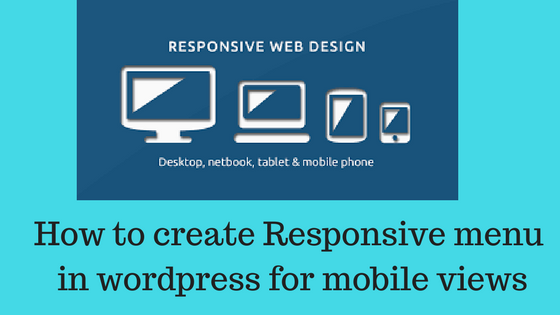
how to create customized menu in wordpress for mobile phone

Hello dosto How to create customize menu in wordpress for mobile phone dosto yadi aap blogger hai ya koi website use karte hai to dosto apki website mobile phone or desktop me ya laptop me jarur open hogi lekin agar apki site me customize menu nahi hai to apki menu proper show nahi hogi

Aaj hum apko batayenge ki kaise hum apni website ke liye customize menu create kar sakte hai jisse hamari website ki menu responsive ho jayenge aur hum easily menu ko control kr payenge dosto chaliye ab start karte hai

Dosto sabse pehle aap apne wordpress me login hoyiye

  • iske baad aap plugin me click
  • add new plugin me click kijiye
  • uske baad aap search box me responsive select menu search kijiye
  • menu ke search hone ke baad aap use install kijiye
  • install hone ke baad aap is menu ko activate kijiye

Apke activate karne ke baad apni website ko aap mobile me load karke dekiye aap website ka diffrent look apko dikhai dega means ab apki website mobile responsive ho gayi hai

Dosto ab vistitors apki website ko acche se visit kar payenge aur easily control par kyoki bahut easy hoga apke menu ko dekhna

Aap chaye to Appreance me jakar responsive select me click karke menu ko aur bhi customize kar sakte hai Dosto yadi aapki ek website hai to apki website me coustomize menu hone bahut hi important hai

How to set up vacation responder (Out of office) in gmail account

Namaskar dosto apka swagat hai hamarihelp me aaj hum apko batyenge ki kaise hum apne gmail account me automatically email send kar sakte hai Dosto aaj ke busy schedule me kisi bhi chiz ka reply fast dena hona chata hai aaj ke time email har koi use krta hai yadi aap ek profestional life jee rahe hai to apke liye email ki kya value hai aap samazte hi honge

Aaj hum apko ek aisa feature batayenge ki jiski madad se aap yadi vacation me aur aapka client ya phir koi bhi aapko mail krta hai to use automatically reply mil jayega jo aap send karna chate hai dosto ye bahut hi accha feature hai gmail ka

Dosto aap sabhi jante ki kisi bhi company ki working style me email ki bahut value hai yadi koi apko email karta hai aur aap use email nahi krte to galat impression badta hai

How to use vacation responder in gmail

  1. First go to gmail account
  2. Login with your username and password
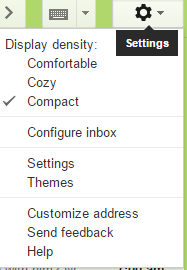
  3. Go to setting
  4. Click on genral
  5. Scroll down

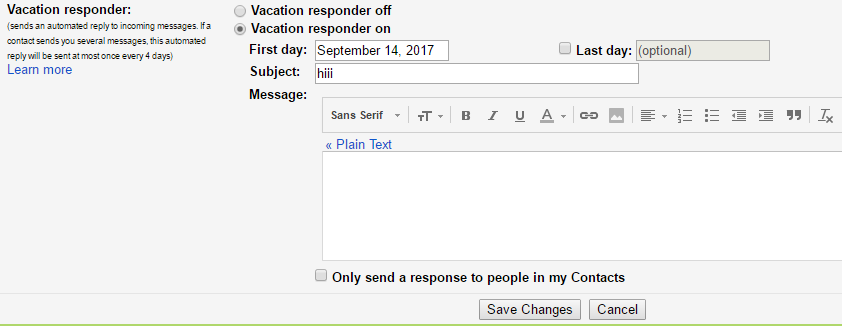
in bottom you see vacation res-ponder option waha apko do option dikhai denge pehle se hi by defaulte auto responder off rehta hai

aap Auto responder ko on kar dijiye

First day set kijiye jab se aap ise on karna chate hai aur last day jab tak aap use on rakhna chate hai

Message ka subject set kijiye for example i am in leave

Aur msg body me reason type kar dijiye aap kyo email ka jawab nahi de pa rahe hai aur kabse aap email ka jawab de payenge Aur save change me click karke save kar dijiye

Dosto apka auto responder on ho jayega

Sabse bada benfit ye hai auto responder ki aapko yadi apka koi client apko mail karta hai to use automatically mail chala jayega ki aap leave me aapne jo auto responder me jo setting ki hai usko accoring mail client ko mil jayega

Dosto aasha karte hai ki aapko ye post acchi lagi hogi yadi apko aur bhi kisi prakar ki jankari chaiye hogi to aap humse comment me puch sakte hai

दाँत निकलवाने के बाद रखी जाने वाली सावधानियां

दाँत निकलवाने के बाद रखी जाने वाली सावधानियां

दोस्तों यदि आप  दाँत निकलवाते है तो आपको कुछ सावधानी राखी पड़ती पड़ती  है इसलिए हम आपको आज बता रहे है की दाँत निकलवाने के बाद रखी जाने वाली सावधानियां क्या क्या है

  1. १ घंटे तक  रुई दवाकर रखे , ज्यादा बात ना करे
  2. १ घंटे बाद icecream /ठंडा जूस /ठंडा पानी /बर्फ खाये
  3. 24 घंटे तक थूके नहीं और ना ही कुल्ला करे
  4. 24 घंटे तक ठंडा ,पतला , एवं नरम आहार  दूसरी  तरफ से ले (दाल ,चावल,खिचड़ी ,दलिया )
  5. ३ दिन तक बीड़ी ,तम्बाकू ,सिगरेट ,गुटका ,शराब आदि का सेवन ना करे
  6. सूजन होने पर बहार से सिकाई करे
  7. खाव सूखने पर कत्रिम दाँत लगवाए
  8.   24 घंटे बाद पानी कुनकुना करके नमक डालकर 5 दिन तक दिन में 5 -6 कुल्ला करे
  9. कुछ तकलीफ होने पर अथवा दवाइया ख़त्म होने पर पुन : डॉक्टर से सम्पर्क करे
  10. दवाईया का सेवन बताये डॉ के अनुसार करे ये सबसे इम्पोर्टेन्ट है

motiyabind operation ke baad savdhaniya

दोस्तों ये सारी सावधानी हमे दन्त रोग विशेषक डॉ मनीष अरोरा जी ने बताई है उनका हम बहुत आभार व्यक्त करते है

श्रीकृष्ण जन्म कथा

जिस कारागार की कोठरी में देवकी और वासुदेव कैद थे, अचानक एकदिन वह प्रकाशमान हो उठा और शंख, चक्र, गदाधारी भगवान विष्णु प्रकट हुए । उन्हें देख दोनों के सारे कष्ट दूर हो गए थे ।

भगवान विष्णु ने कहा, वासुदेव मैं तुम्हारे संतान के रूप में जनम लूंगा और तुम मुझे अपने मित्र नन्द और यशोदा के पास वृंदावन छोड़ आना, साथ ही यशोदा की घर जन्मी बेटी को यहाँ ले आना और कंस को दे देना । दोनों ने उनके चरण छू आशीर्वाद लिए ।

वासुदेव ने वैसा ही किया जैसा उन्हें भगवान विष्णु ने करने को कहा था । जैसे ही देवकी ने नन्हे कृष्ण को जन्म दिया, वासुदेव उन्हें एक टोकरी में रख वृंदावन के लिए निकल पढ़े । वह दिन आलौकिक था, सारे कारागार के पहरेदार सो रहे थे । यमुना नदी में भयंकर तूफान था । ज्यूँ ही वासुदेव यमुना को पार करने लगे, नदी ने उन्हें रास्ता दे दिया । उस तूफान और बारिश के बीच नन्हे कृष्ण की रक्षा के लिए शेषनाग भी पहुँच गए ।  वह दृश्य अत्यंत अद्भुत था । भगवान् स्वयं पृथ्वी पर आये थे, दुष्टों के दमन के लिए ।

श्री कृष्ण के जन्मदिवस को उनके भक्त बड़े प्रेम से आज तक जन्माष्टमी के रूप में मनाते हैं।

वासुदेव ने नन्द और यशोदा के पास नन्हे कृष्ण को छोड़ा और उनकी नवजात बेटी को ले वृन्दावन से मथुरा की ओर चल पढ़े । उनके मन में भी तूफान उठा हुआ था । जैसे ही वह वापस कारागार में पहुंचे द्वार फिर खुल गए और बन्ध भी हो गए । कंस को ज्यूँ ही पता चला की आठवें संतान का जन्म हो चूका है, वह कारागार की तरफ भगा । कोठारी में पहुँचते ही उसने बच्ची को उठा कर दूर फेंकना चाहा , परंतु तभी उस बच्ची ने दुर्गा का रूप लिया और कंस को कहा – अरे मुर्ख, जो तेरा वध करेगा, वह वृंदावन में पहुँच चूका है । तेरा अंत अब समीप है । यह सुन कंस को बहुत गुस्सा आया और उसने वृंदावन के सभी नवजात बच्चों को मारने के लिए कई दैत्य भेजे । वृन्दावन भी उसके अत्याचारों से अछूता न रहा । कृष्ण के वध के लिए कंस ने पूतना राक्षशी को भेजा ।