Home Blog Page 22

how to make desktop look beautiful in windows 10

how to make windows 10 look beautiful if you want to make your your windows look cools so follow these steps for making your windows Cool and awesome with the help of this software your desktop look beautiful

Today i will tell you how to give cool look to your desktop

So friends following steps

  1. First go to

           Rocket dock link

      2 you have need to download that software

      3. after download you have need to install this software

     4. Now you Desktop look like this

this software give very cool and attractive look to our computer or laptop

mppsc answer key Set A B C D 2019

Mppsc prelims exam jo ki 12.01.2020 ko huye jisme lagbhag 3.5 lac logo ne exam diya hai aur apni kismat ajamai uski answer sheet aa gayi hai aap mppsc ki answer sheet apne set ke accoriding dekh sakte hai mppsc ne peper 1 and peper 2 dono ki answer key upload kar di hai

Kaise download kare mppsc ki answer key

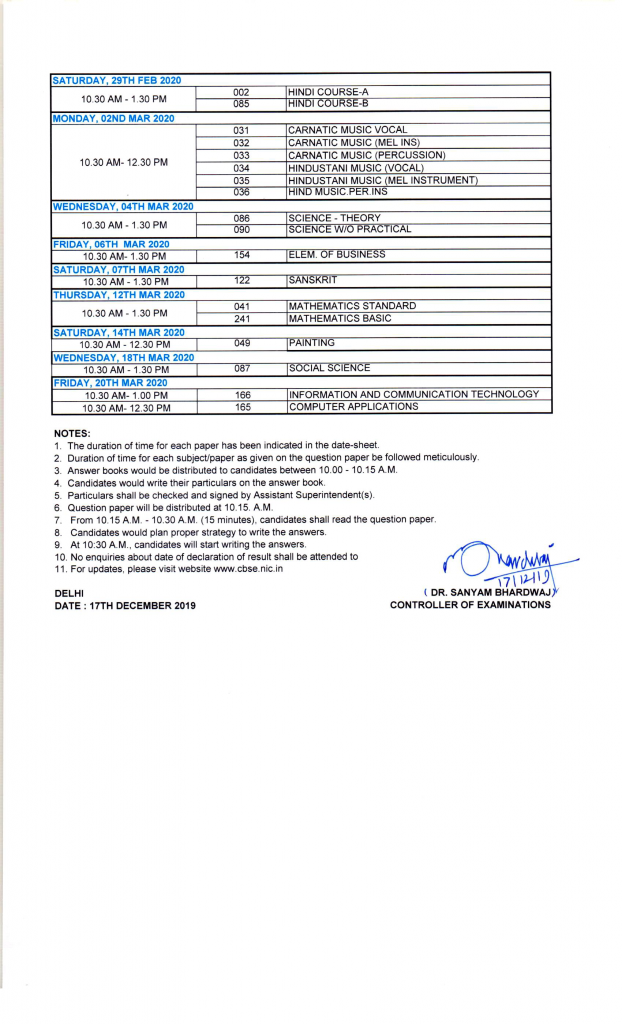
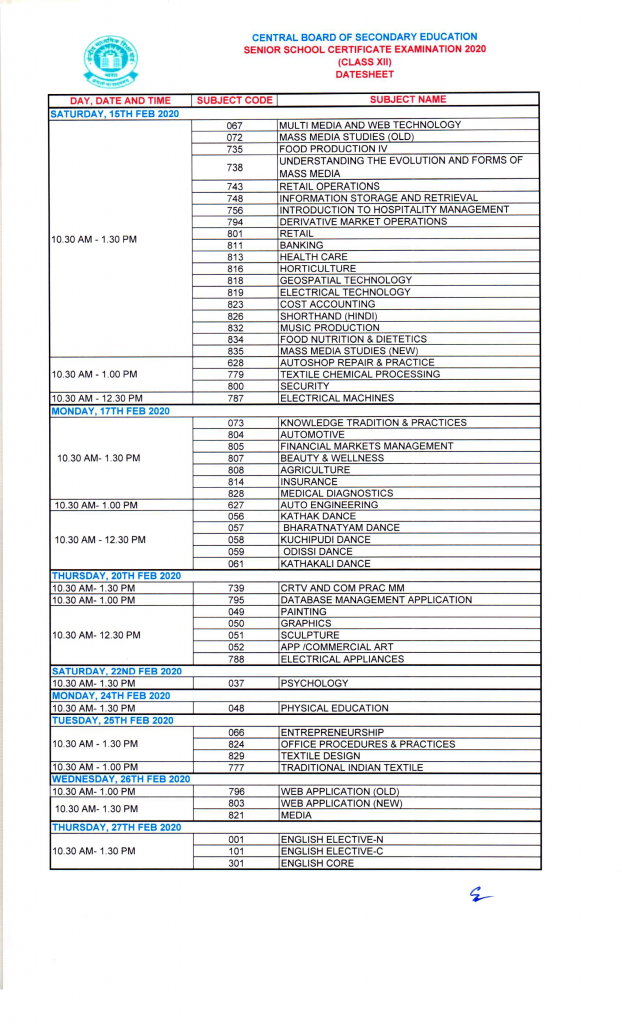
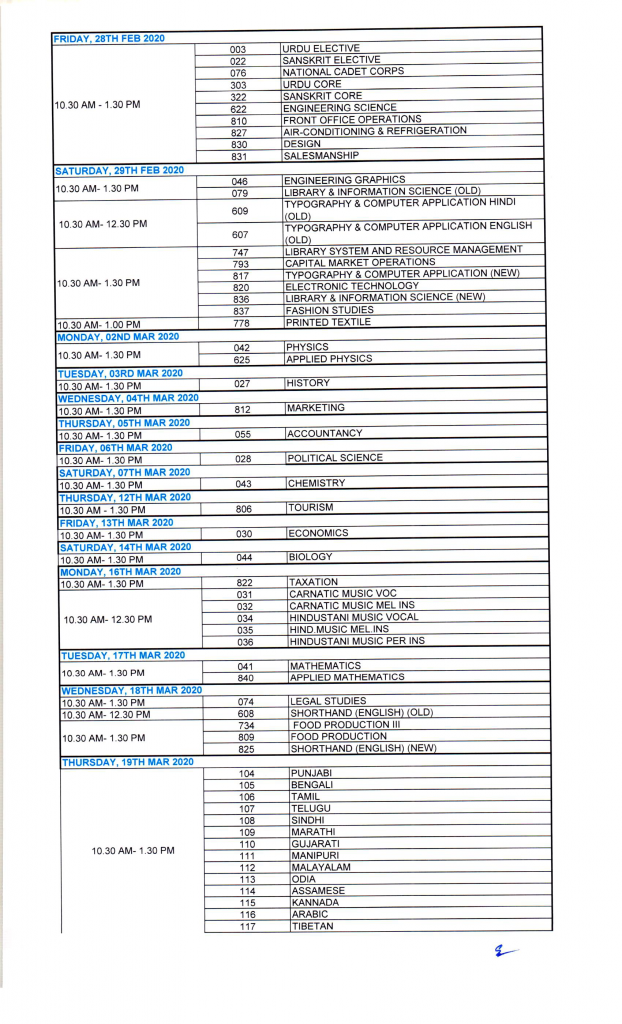
Cbse 10th 12th exam time table 2020

Cbse Central board of secondary education ne apne 10th aur 12th board ka time upload kar diya hai aap yadi 10 th 12th board me hai to tyari suru kar le taki aap acche marks se pass ho jaye apke pas limited days hai so study me focus kare

CBSE 10th board ke exam exam 15 feb 2020 se start honge aur 20 march ko end honge

CBSE 12TH board ke exam 15th feb 2020 se start honge and 30 march ko end honge

Mp board 12th time table 2020

Mp board 12th time table 2020 : madhyapredesh board 2020 time table Hindi and English medium mp board ki official website me upload kiye ja chuke hai madyapredesh board of secondary education (mpbse) ne apne mp board 12th Arts commerce and science Exam 2 March 2020 se start honge aur 11 April 2020 ko end honge

MP Board 12th Time Table 2020 Download

MP Board 12th Exam Time table from the official website of Madhya Pradesh Board follow the steps given below:

  • MP Board ki official website me jaaye mpbse.nic.in
  • home page me apko time table ki link dikhai degi
  • jaise hi aap is link me click karenge apke samne time table ki list khul jayegi waha se time table 2020 par click kar de
  • is pdf file ko save kar le
  • aap chaye to print out bhi le sakte hai

Mp board 10th time table 2020

Mp board 10th time table 2020 : madhyapredesh board 2020 time table Hindi and English medium mp board ki official website me upload kiye ja chuke hai madyapredesh board of secondary education (mpbse) ne apne mp board 10th class ke Exam 3 March 2020 se start honge aur 27 march 2020 ko end honge

MP Board 10th Time Table 2020 Download

MP Board 12th Exam Time table from the official website of Madhya Pradesh Board follow the steps given below:

  • MP Board ki official website me jaaye mpbse.nic.in
  • home page me apko time table ki link dikhai degi
  • jaise hi aap is link me click karenge apke samne time table ki list khul jayegi waha se time table 2020 par click kar de
  • is pdf file ko save kar le
  • aap chaye to print out bhi le sakte hai

Video : kaise MP board ka time table download kare

cpct result kaise dekhe

Cpct means computer proficiency certificate test jo ki computer knowledge ka test hota hai jo ki madyapredesh govement ke it department dwara liya jata hai computer related job me kaam me aata hai hai

kaise hum Cpct ka result or Scorecard Dekhe

Sabse pehle cpct ki website visit kare

Apni user id aur password dalkar login kare

Exam select kare

uske baad score card par click kare

score card download par click kare aur score card download karle

how to download CPCT Admit card

how to download cpct admit card CPCT admit card ,Cpct admit card kaise download kare yadi aapne CPCT Exam form fill kiye to CPCT ke Admit card card aa gaye hai to aap CPCT ke admit card download kar sakte hai ye aapke liye bahut hi helpful honge

How to download CPCT admit card Download

  • Sabse pehle Di gayi hui link par click kijiye
  • ek page open hoga waha par aap User ID and password Enter kijiye
  • login karne ke baad kuch option dikhai denge
  • agar aapne exam diye hai to to apka aplication aur peronal details form tab milega apko application details me click karna hai yadi apne first time exam diya hai to waha par aap direct application details pe click kare aur yadi second time exam de rahe hai to jo exam de rahe hai uska exam ke application number par click kare
  • application form tab me click karne ke bad new tab open ho jayegi waha par aap hall ticket wale option me click kare
  • waha assessement me choose kare exam apko show hoga
  • search option me click kare waha apko niche admit card dikhai dega waha se aap download button me click karke admit card download kar le

How to dowload CPCT Admit card

:Click here to download : Cpct admit card December 2019

yadi aapke kuch question hai to aap comment section me puch sakte hai

Mppsc form edit kaise kare 2019

Mppsc form Edit kaise kare Yadi aapne apna mppsc ka form submit kar diya hai aur apko lagta hai ki apne form fill karte time koi mistake kar di hai to chinta mat kijiye aap mppsc ka form edit kar sakte hai

Form kaise Edit kare

yadi aap mppsc ka form edit karna chate hai to niche kuch steps di ja rahi usko folllow kare aap asani se mppsc ka form edit kar payenge

  • mppsc ki website me jaaye
  • waha par edit your application par click kare
  • uske baad ek page open hoga usme apna applilcaton number enter kijye aur date of birth enter kijiye
  • form open ho jayega aap apne jaha mistake kiye hai uska sudhar kar lijiye

mppsc notification 2019 for 538 posts

Good news aap sabhi ke liye dosto mppsc ne 538 post ke liye hone wali state service exam ki date declare kar di hai yadi aap bhi mppsc ke form fill karna chate hai to jald se jald fill kar lijiye kyoki mppsc form fill karne ki last date 09 december 2019 hai iske baad aap form fill nahi kar payenge isliye aap mppsc ka form fill karna chate hai to is post ko pura pade

Name of post : MPPSC State Service Examination 2019

No of posts -538

Fee : 500 Rs For Others and SC/ST : 250 Rs

Mppsc Exam Date : 12/01/2020

Age limit : Minimum age :21 years and maximum : 40 years and also get relaxation by govt rules

Education Qualification : apka graduation hona chaiye ya final year me hona chaiye to aap ye vacancy fill kar sakte hai

Vacancy post

Asst Labour Officer
District Exercise Officer
District Manager
Chief Municipal Officer
Development Block Officer
District Coordinator/ Asst Project Administrator/Asst Director
Area Coordinator / Development Block Officer
Asst Director/ Manager
Exercise Sub Inspector
Deputy Prosecutor

Deputy Collector
Deputy Superintendent of Police
Jr Pay Scale Officer/ Accounts Officer/ Asst Director
Asst Director
Naib Tehsildar
MP Subordinate Accounting Service
Commercial Tax Officer

Last Date for online Form filling is 9 December 2019

Apply online Before last date : Apply here

mppsc form ko fill karte समय रखी जाने वाली सावधानीया

Dosto agar aap mppsc ka form fill kar rahe hai aaj hum apko batane jaa rahe hai mppsc ka form fill karte time kya kya shavdhani rakhe jisse ki hamara form reject na ho to dosto is post ko dhyan purvak pade

1 sabse pehle aap exam ka select kijiye yadi aap sirf state service ka exam dena chate hai to sirf state service select kijiye or yadi aap state forest service ka exam bhi dena chate hai to both select kijye or other wise ek exam select kijiye

2 . apna naam apne mammi papa ka naam date of birth bilkul sahi enter kare

3. yadi aapne marrige kiye hai to uski sahi details enter kare

4.apne rojghar panijyan ki sahi jankari enter kare .

5. yadi aap phd category hai to to uski sahi janakari enter kare

6. yadi aapke upar koi kanuni karwayi hui hai ya nahi hui uski sahi jankari enter kare

7. yadi apne education me graduation kar liya hai to ok yes kar de aur yadi aap graduation ke final year me hai to usme click karke jo jankari mangi gayi hai wo sahi tarike se fill kare

8. apni education ki puri puri sahi jankari de grade passing year enter karte time pura dhyan de

9. Apna address enter karte time pura dhayan rakhe ki aap address sahi enter kar rahe hai पत्राचार का पता ka aur स्थायी पता fill kar sakte time dhayan purvak fill kare

10. photo aur sign upload karte time ye dhyan de ki apki photo aur sign acche tarike se dikhai de

11. Apna mobile no aur Email id bilkul sahi enter kare nahi to apko form fill karne me bahut saari problem hogi

at last apne form ko acche se check karke submit kar de